


Spider Solitaire Classic
4.72.15K Reviews
App Specs
- Version
- 1.7.2
- Updated On
- License
- Free
- Downloads
- 10,000,000+
- Developer
- Game Maker Ltd.
- Categories
- Card
- Platform
- Android, iOS
Screenshots


 Analysis by AppCompare
I approached Spider Solitaire Classic as the kind of card game I can dip into for a few minutes, then return to when I have more time. Its appeal is straightforward: familiar solitaire rules, adjustable challenge, and a format that suits a phone. That simplicity is also its main trade-off. If you want a story, constant novelty, or a social game, this is not trying to provide those things; if you want a quiet puzzle to work through at your own pace, it makes a convincing case.
In my experience, Spider Solitaire works best when I treat each deal as a sequence of choices rather than a race to clear cards. The satisfying moments come from making space, uncovering a useful card, and deciding whether to commit to a move or preserve flexibility. That makes it more mentally engaging than a game I play entirely on autopilot, while still being easy to pause when daily life interrupts.
A familiar game with room to set your own pace
The basic attraction is the flexibility to choose a level of difficulty that matches my mood. A lighter setup is a sensible place to learn the rhythm of building sequences, while a tougher one asks for more careful planning and patience. Having one-, two-, and four-suit options gives that choice a practical shape: I can keep a session relaxed or make it more demanding without switching to a different kind of game.
One useful habit is to pause before filling an empty column. Empty space can be valuable, so I try to think about which sequence I might move there and whether that will uncover something helpful. It is tempting to make the first legal move, but a move that looks tidy can leave fewer options afterward. The undo feature is helpful for checking that instinct: I can test a choice, see what it blocks, and reconsider without turning one mistake into a reason to abandon the deal.
The app is a card game from Game Maker Ltd. and is free to download, with optional in-app purchases priced from $0.99 to $9.99 per item. I would start with the free experience and decide for myself whether anything beyond it is worth paying for; the core reason to install a Spider Solitaire game is the card puzzle, not a promise of extras. It is rated for Everyone, and the current version is 1.6.6, which is useful context if you are checking whether it suits your device and household.
Small decisions matter more than quick taps
Daily challenges are a good way to give a familiar format a specific goal. Rather than starting a deal with no particular purpose, I can use a challenge as a short test of how I handle a new puzzle. The reward element may add motivation, but I would not make it the reason to play: the more lasting value is noticing how a different arrangement changes my priorities.
For a practical session, I might play during a quiet stretch between errands or while waiting for an appointment. I can make a few moves, put the phone away, and come back when it suits me. Spider Solitaire is especially comfortable in that sort of stop-and-start routine because the central activity is thinking through the layout, not keeping up with other players. If I have only a minute, I can still make progress; if I have longer, I can take more care over the order of moves.
Worth Reading Before You Choose

Flipboard Shows What News Apps Must Do Beyond the Feed

Switching to Android Auto Means Rethinking Your Driving Routine

Google Calendar Makes a Crowded Week Easier to Manage

Ludo King Makes the Most of the Minutes Between Plans

Baby Panda World Brings Quick Play to Modern Phones, but Its Game Library Feels Busy

ESPN’s Live Game View Makes Following Close Games Easier
The hint system is best treated as a nudge, not a substitute for thinking. When I am stuck, I can use it to notice a move I overlooked, then consider why that move helps before tapping it. That small pause turns a hint into a learning tool. If I simply follow suggestions without examining the board, I may finish a hand without getting better at spotting sequences or preserving useful spaces.
What the mobile version gets right—and where it can feel limited
Clear card faces and smooth animations matter more here than flashy presentation, because most of the screen is a board I need to read. The visuals are crisp and the cards are easy to distinguish, so I can focus on the arrangement instead of fighting the interface. The background music and sound effects are restrained enough to sit behind a concentration-heavy game, and the option to change card backs and backgrounds gives the table a more personal feel.
That visual polish does not change the fundamental repetition of solitaire. The same basic objective remains at the center, and even daily challenges are variations on that familiar activity rather than a new mode of play. Someone who loses interest once they recognize a game’s pattern may find that the changing deals are not enough to hold attention over time. I see this as a focused card pastime, not a broad collection of activities.
Offline play is a particularly useful fit for travel, waiting rooms, or places where a connection is unreliable. It lets me keep the game available when I cannot count on being online, although that does not make it a multiplayer experience. If my priority is competing live with friends or chatting while I play, I would choose a different card game. Here, the appeal is having a solo puzzle ready without needing to coordinate with anyone.
The leaderboard, achievements, and statistics can give regular players a reason to track progress, but they are optional motivations rather than the heart of the game. I would pay most attention to my own consistency: which suit setup I enjoy, how often I need a hint, and whether I am leaving myself workable moves. Comparing scores can be fun, but it is not a perfect measure of skill when players may choose different difficulty settings or approach sessions at different levels of patience.
How it compares with other ways to play solitaire
Against a paper deck, the app saves setup and makes it easy to start another deal, while a physical game offers the tactile handling that a screen cannot reproduce. Compared with simpler solitaire apps, the choice of suit complexity and the undo and hint tools make this version more accommodating when I want either a gentler session or a chance to learn from a mistake. The customization adds a little ownership, too, though it is not a substitute for deeper variety.
Compared with a fast arcade or competitive card game, this one asks for a slower kind of attention. There is no need to react quickly to an opponent; the challenge is to read the board and avoid narrowing the choices too early. That makes it a better fit for a calm break than for a burst of high-energy play. If I want changing objectives, a narrative, or direct interaction with other people, I would look elsewhere rather than expect Spider Solitaire to become something it is not.
Who is likely to enjoy it
I would recommend it to people who already like solitaire, anyone who wants a low-pressure puzzle for short gaps in the day, and beginners who appreciate being able to adjust the challenge. The range from one suit to four suits means a new player does not have to begin at the hardest end, while experienced players can choose a more demanding layout. The game’s 4.8 average rating from around 25,000 ratings and more than 10 million installs suggest that this familiar format has found a large audience, though those figures cannot tell me whether it will match an individual player’s taste.
I would steer away from it if I needed constant new content, competitive multiplayer, or a game with a strong sense of progression beyond playing hands and tracking results. It is also not ideal when I want something that demands almost no thought: a difficult deal can ask for patience, and a careless move may make the remaining layout harder to manage. That is part of the puzzle, but it will not suit everyone looking for a purely passive distraction.
For anyone deciding whether it will run on an older phone, the listed minimum is Android 6.0. That offers a useful compatibility check, but I would still consider how comfortable I find card games on my particular screen: a larger display can make a spread easier to scan, while a smaller phone may encourage shorter sessions. Either way, I would start with the easier suit setting, learn how moving sequences affects empty columns, and increase the challenge only when the simpler deals feel routine.
The Classic Card Game in Your Pocket
Spider Solitaire Classic brings the timeless card game to life on your smartphone or tablet. The app maintains the charm of its predecessor while adding modern twists that make it even more engaging. The user interface is clean and intuitive, making it easy to dive right into the game, whether you’re a seasoned player or a newbie.
Gameplay and Features
The game offers a range of difficulty levels, from beginner to expert, allowing you to challenge yourself as you improve. With one, two, and four-suit options, you can choose the complexity that suits your mood. The app even includes an undo feature for those moments when you make a hasty move.
One of the standout features is the daily challenges. These are perfect for testing your skills with unique puzzles every day. Completing these challenges can earn you rewards and keep the game fresh and exciting.
Visuals and Soundtrack
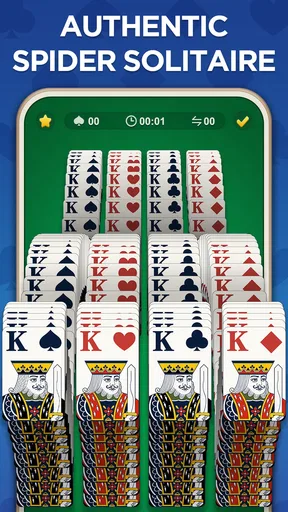
The visuals are crisp and vibrant, providing a pleasing aesthetic that enhances the gaming experience. The cards are easily readable, and the animations are smooth, making for a delightful visual journey. The subtle background music and sound effects add to the atmosphere without being intrusive, allowing you to focus on your strategy.
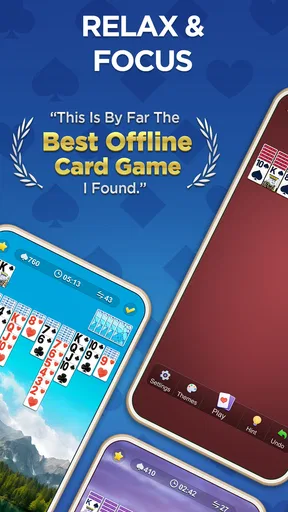
For those who appreciate personalization, the app allows you to change the card backs and backgrounds. This means you can play Spider Solitaire Classic in a style that feels like your own.
Usability and Performance
The app is well-optimized, running smoothly even on older devices. I experienced minimal lag and the load times were impressively quick. The developers clearly focused on creating a seamless user experience, which is evident in every aspect of the app.
Moreover, the app supports offline play, which is a huge plus for those moments when you’re on the go without internet access. Whether you’re commuting or just need a quick break, you can enjoy a game of Spider Solitaire without any hassle.
Additional Features
For the competitive spirit, the app includes a leaderboard where you can see how you stack up against other players. Achievements and statistics tracking are also available, allowing you to monitor your progress and strive for personal bests.
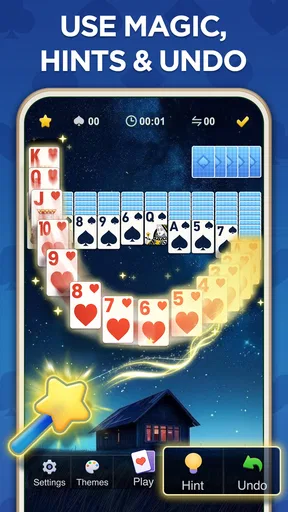
Another useful feature is the hint system, which can help you out when you’re stuck without giving away the entire solution. It’s a great way to learn and improve your game without feeling frustrated.
Final Thoughts
Overall, Spider Solitaire Classic is a fantastic adaptation of the classic game for mobile devices. It retains the essence of the original while offering new features that enhance the experience. Whether you’re looking to pass the time or engage in strategic gameplay, this app has something for everyone.
So, if you’re eager to relive the classic card game days or try it for the first time, download Spider Solitaire Classic and start playing. You won’t be disappointed!
Pros
- Intuitive and easy-to-use interface.
- Smooth animations enhance gameplay.
- Multiple difficulty levels available.
- Offline mode for uninterrupted play.
- Regular updates with new features.
Cons
- Contains in-app advertisements.
- Limited customization options.
- No multiplayer or social features.
- Battery consumption could be high.
- Lacks detailed tutorials for beginners.
FAQs for Spider Solitaire Classic
What features does Spider Solitaire Classic offer?
Spider Solitaire Classic provides a range of features including multiple difficulty levels, customizable card designs, and an intuitive interface. The game also supports unlimited undo options, hints for possible moves, and an auto-save feature to resume your game anytime. Additionally, players can track their progress with in-game statistics.
Is Spider Solitaire Classic free to play?
Yes, Spider Solitaire Classic is free to download and play on both Android and iOS devices. However, the app may include optional in-app purchases to unlock additional features or remove ads. These purchases are not required to enjoy the full gameplay experience.
Does Spider Solitaire Classic require an internet connection?
No, Spider Solitaire Classic does not require an internet connection to play. This makes it a great option for enjoying the game offline, whether you're traveling or in an area with limited connectivity. However, be aware that some features, like ad removal, may need internet access.
How user-friendly is the interface of Spider Solitaire Classic?
The interface of Spider Solitaire Classic is designed to be user-friendly and accessible for all players. The game offers simple drag-and-drop mechanics, clear visuals, and easy navigation. Beginners and experienced players alike will find the controls intuitive and the overall layout convenient for extended play sessions.
Can I play Spider Solitaire Classic on multiple devices?
Spider Solitaire Classic can be downloaded and played on multiple devices, as it is available on both Android and iOS platforms. However, progress may not sync automatically across devices unless the game offers a cloud save feature or is linked to a social media account. It's recommended to check the app's settings for any synchronization options.


